
Warm Transfer vs Cold Transfer: Smart Call Routing for AI Agents
Table of Contents
When an AI phone agent reaches the limits of what it can handle, it needs to transfer the call to a human. How that transfer happens matters more than most developers realize. A bad transfer loses the caller's context, forces them to repeat everything, and destroys the trust the AI just built. A good transfer feels seamless — the human picks up already knowing who the caller is, what they need, and what the AI already discussed.
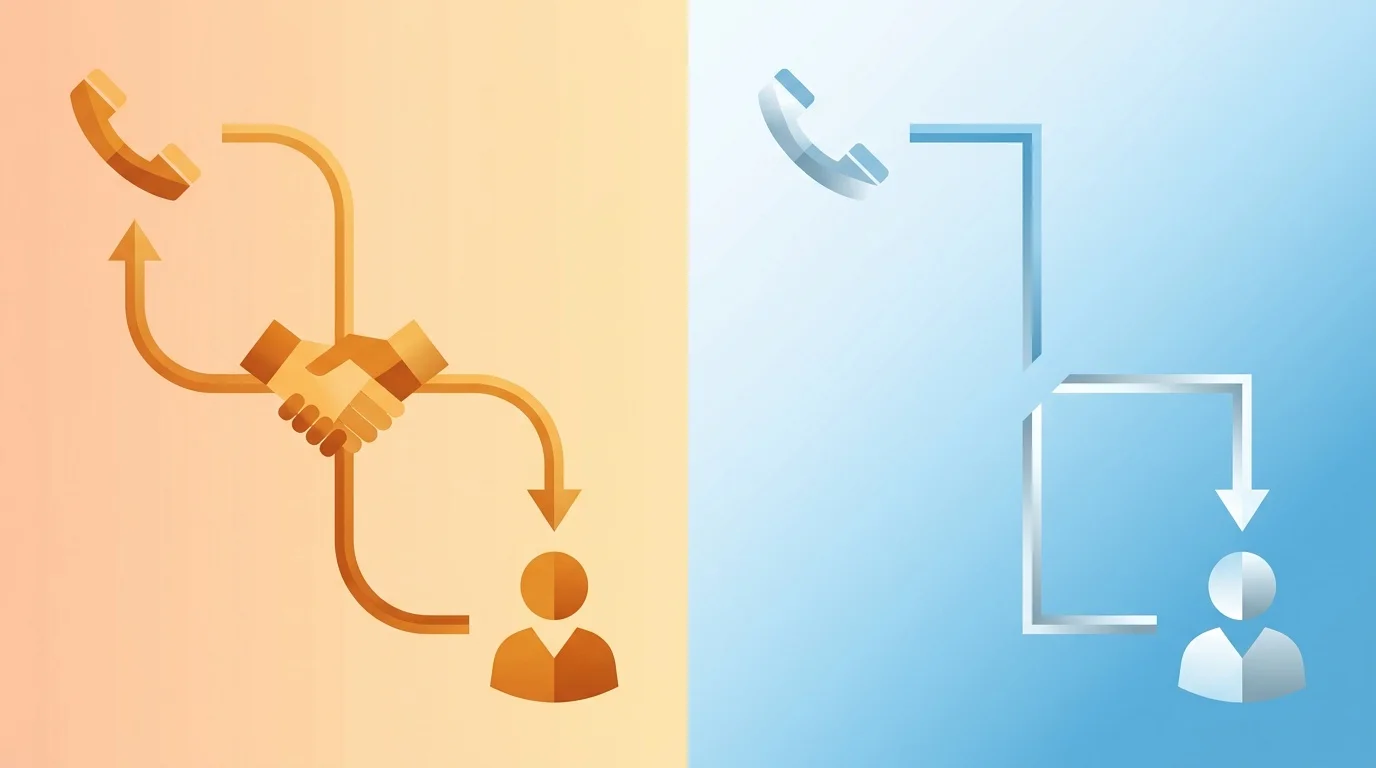
This is the difference between a cold transfer and a warm transfer. For AI phone agents, getting this right is the difference between a caller who stays engaged and one who hangs up.
What Is a Cold Transfer?
A cold transfer (also called a blind transfer) sends the caller directly to another number or extension without any introduction or context sharing. The AI agent says "Let me transfer you" and the caller lands on the new line. The receiving party has no idea who is calling or why.
How it works technically:
- AI agent decides to transfer the call
- API call is made to the transfer endpoint with the destination number
- The telephony platform connects the caller to the new number
- The AI agent disconnects from the call
- The receiving party answers with no context
# Cold (blind) transfer via API
curl -X POST "https://agents.bubblyphone.com/api/v1/calls/{call_id}/transfer" \\
  -H "Authorization: Bearer bp_live_sk_your_key" \\
  -H "Content-Type: application/json" \\
  -d '{"to": "+13125559999"}'
When cold transfers work:
- Transferring to a general queue (support hotline, sales desk)
- Simple routing where the destination handles many different call types, or into an ACD queue
- When speed matters more than context (emergency lines)
- Transferring to voicemail or an automated system
When cold transfers fail:
- The caller has already explained their issue to the AI and does not want to repeat it
- The receiving agent needs context to help efficiently
- The caller is already frustrated and a cold "let me transfer you" feels dismissive
What Is a Warm Transfer?
A warm transfer passes the caller to a human agent along with context about the conversation. The receiving agent knows who the caller is, what they discussed with the AI, and what they need before they even say hello.
There are two variations:
Announced Warm Transfer
The AI places the caller on hold, calls the human agent, provides a brief summary ("I have John from Acme Corp on the line. He is interested in our enterprise plan and has questions about Jira integration."), and then connects the caller.
Context-Passed Warm Transfer
The AI transfers the call directly but sends a data payload (summary, transcript, caller info) to the receiving agent's system simultaneously. The human agent sees the context on their screen as the caller connects. No hold time, no verbal briefing.
How context-passed warm transfer works:
- AI agent decides to transfer
- AI invokes a tool to send the call summary to the receiving system
- Simultaneously, the API transfers the call to the human agent
- The human agent sees the context on their dashboard before answering
- Human greets the caller with context: "Hi John, I see you were asking about our Jira integration. Let me help with that."
Why Warm Transfers Matter for AI Agents
Warm transfers are especially important when an AI is the first point of contact, because the caller has already invested time in a conversation.
The Repetition Problem
Studies consistently show that having to repeat information is the number one frustration for callers. When your AI agent spends 2 minutes understanding the caller's issue and then cold-transfers them to a human who asks "How can I help you?", all that effort is wasted.
Trust Continuity
A well-executed warm transfer signals competence. The caller thinks: "The AI understood me, and now the human already knows my situation." A cold transfer signals the opposite: the systems are disconnected and the caller is just another voice in a queue.
Efficiency for Human Agents
Warm transfers reduce average handle time for human agents by 30–45 seconds per call. The agent does not need to ask qualifying questions the AI already answered. Over thousands of calls, this is significant cost savings.
Conversion Impact
For sales calls, warm transfers to human reps convert at significantly higher rates than cold transfers. The human rep starts the conversation informed and can immediately address the prospect's specific interests rather than starting from scratch.
Implementing Transfers for AI Phone Agents
Here are three approaches to implementing call transfers with BubblyPhone Agents, from simplest to most sophisticated.
Approach 1: Auto-Transfer Tool (Simplest)
BubblyPhone Agents has a built-in auto-transfer capability. Configure a transfer number on your phone number, and the AI agent automatically gets a transfer tool it can invoke during the conversation.
PATCH /api/v1/phone-numbers/{id}
{
  "transfer_number": "+13125559999",
  "auto_transfer_tool": true,
  "system_prompt": "You are a receptionist for Acme Corp. Answer questions about our services. If the caller wants to speak with a human, discuss pricing details, or has a complaint, transfer them using the transfer tool."
}
The AI agent decides when to transfer based on its system prompt instructions. When it invokes the transfer tool, BubblyPhone handles the rest — connecting the caller to the configured number.
This is a cold transfer, but it is effective because the AI can provide a warm closing: "I am transferring you to our sales team now. I have let them know you are interested in the enterprise plan."
Approach 2: Custom Transfer with Context (Recommended)
For a true warm transfer, use a custom tool that sends context to your backend before transferring.
{
  "system_prompt": "You are a support agent. If you cannot resolve the issue, use the transfer_to_human tool. Provide a detailed summary of the conversation so far.",
  "tools": [
    {
      "name": "transfer_to_human",
      "description": "Transfer the caller to a human agent with full context",
      "parameters": {
        "summary": {
          "type": "string",
          "description": "Brief summary of the conversation and the caller's issue"
        },
        "department": {
          "type": "string",
          "enum": ["sales", "support", "billing", "management"],
          "description": "Which department should handle this call"
        },
        "priority": {
          "type": "string",
          "enum": ["normal", "urgent"],
          "description": "Call priority based on the caller's tone and issue severity"
        },
        "caller_name": {
          "type": "string",
          "description": "The caller's name if provided"
        }
      }
    }
  ]
}
Your webhook handler receives this context, routes to the right agent, and passes the summary to their dashboard:
@app.post("/webhooks/tools")
def handle_tool_call(request):
    tool = request.json["tool_name"]
    params = request.json["parameters"]
    call_id = request.json["call_id"]

    if tool == "transfer_to_human":
        # 1. Send context to your agent dashboard
        notify_agent_dashboard(
            department=params["department"],
            context={
                "caller_name": params["caller_name"],
                "summary": params["summary"],
                "priority": params["priority"],
                "call_id": call_id
            }
        )

        # 2. Look up the right agent's number
        agent_number = get_available_agent(params["department"])

        # 3. Transfer the call
        requests.post(
            f"https://agents.bubblyphone.com/api/v1/calls/{call_id}/transfer",
            headers={"Authorization": f"Bearer {API_KEY}"},
            json={"to": agent_number}
        )

        return {"result": f"Transferring to {params['department']}. Let the caller know."}
The AI receives the tool result and can tell the caller: "I am connecting you with our support team now. I have shared the details of your issue so you will not need to repeat anything."
Approach 3: Conference-Based Warm Transfer (Advanced)
For the highest-quality warm transfer, use a conference bridge approach:
- AI places the caller on a brief hold
- AI calls the human agent on a separate leg
- AI briefs the human agent verbally (or sends a screen pop)
- AI connects all parties
- AI drops off the call
This requires more complex telephony orchestration but delivers the best experience. The human agent literally hears a briefing before the caller is connected.
When Should AI Agents Transfer?
Knowing how to transfer is only half the challenge. Knowing when to transfer is equally important. Define clear transfer criteria in your system prompt and call flow.
Transfer Triggers
Anti-Patterns to Avoid
Transferring too eagerly: If the AI transfers at the first sign of difficulty, it defeats the purpose of having an AI agent. Train it to handle common objections and questions first.
Transferring too late: If the AI keeps trying to help when it clearly cannot, the caller gets frustrated. Set a clear escalation threshold (e.g., if the caller asks for a human twice, transfer immediately).
Transferring without warning: Always tell the caller what is happening. "I am going to connect you with someone who can help with that" is better than sudden silence.
Transferring to the wrong department: Use the AI's conversation understanding to route to the right team. A billing question should not land on the sales desk.
Measuring Transfer Quality
Track these metrics to optimize your transfer strategy.
Transfer Rate
Formula: (Transferred calls / Total calls) × 100
A transfer rate of 20–40% is typical for AI agents handling inbound calls. If it exceeds 50%, your AI needs better training (improve the system prompt, add tools, expand its knowledge). If it is under 10%, verify the AI is not failing to transfer when it should.
Post-Transfer Resolution Rate
What percentage of transferred calls are resolved by the human agent? If it is low, the AI may be transferring for reasons the human cannot solve either — indicating a process problem, not a transfer problem.
Caller Satisfaction Post-Transfer
Use call analysis and sentiment analysis on the post-transfer conversation to measure satisfaction. Compare satisfaction between warm and cold transfers to quantify the impact.
Transfer Wait Time
How long does the caller wait between the transfer being initiated and the human answering? Long wait times negate the benefits of a warm transfer. If humans are frequently unavailable, implement a callback system.
Repeat Transfer Rate
How often does the human agent need to transfer the call again? A high rate indicates the AI is routing to the wrong department. Refine the department classification in your transfer tool.
Handling Edge Cases
No Human Available
What happens when the AI tries to transfer but no human is on the line? Plan for this:
{
  "system_prompt": "...If the transfer fails or the agent is unavailable, apologize and offer to: 1) Take the caller's number and have someone call back within 30 minutes, 2) Send the information via email, or 3) Schedule a specific callback time using the schedule_callback tool."
}
After-Hours Transfers
If your AI agent runs 24/7 but your human team does not, handle after-hours transfers gracefully:
{
  "system_prompt": "...Our support team is available Monday to Friday, 9am to 6pm Eastern. If the caller needs a human outside these hours, use the schedule_callback tool to book a callback during business hours. Do not attempt to transfer — it will fail."
}
Multi-Leg Transfers
Sometimes the first human cannot help and needs to transfer again. This is where warm transfers are critical — the context should follow the call through multiple transfers. Pass the AI's original summary and the first human's notes to the next agent.
International Transfers
If your business spans regions, the AI may need to transfer to numbers in different countries. Plan capacity with concurrent calls in mind. Ensure your telephony platform supports international transfers and that the cost is accounted for. BubblyPhone Agents supports transfers to numbers in 40+ countries.
Frequently Asked Questions
What is the difference between a warm transfer and a cold transfer?
A cold transfer sends the caller to a new number with no context — the receiving party has no idea who is calling or why. A warm transfer passes context (caller name, conversation summary, issue details) so the receiving agent can pick up where the AI left off. Warm transfers reduce repeat information and improve caller satisfaction.
Can AI phone agents do warm transfers?
Yes. AI agents can generate a conversation summary and pass it to the receiving agent's system via a tool call before initiating the transfer. With BubblyPhone Agents, you configure a custom transfer tool that sends context to your backend and then transfers the call via the API.
How do I decide when the AI should transfer?
Define explicit transfer criteria in the system prompt: explicit requests to speak with a human, topics outside the AI's scope, escalations, high-value leads, and confusion loops where the AI and caller are going in circles. Include both "must transfer" triggers and "try to resolve first" instructions.
Does warm transfer add delay?
Context-passed warm transfers (where context is sent as data) add negligible delay — the context is sent simultaneously with the transfer. Announced warm transfers (where the AI briefs the human agent verbally) add 10–30 seconds of hold time for the caller.
What is a good transfer rate for AI agents?
For inbound AI receptionists and support agents, 20–40% transfer rate is typical and healthy. This means the AI resolves 60–80% of calls autonomously. For outbound sales agents, transfers happen less frequently — typically 5–15% for warm leads being handed to human closers.
How do I test my transfer setup?
Use the BubblyPhone Agents sandbox to make test calls. Call your AI number, trigger a transfer scenario, and verify the context reaches your backend and the call routes correctly. Test both the happy path and edge cases (no human available, after hours, wrong department).
Conclusion
Call transfers are the handshake between your AI agent and your human team. Cold transfers are quick but lose context. Warm transfers preserve context and keep callers happy. For AI phone agents, warm transfers are not a luxury — they are essential for maintaining the quality of the conversation the AI started.
The best approach for most teams is a context-passed warm transfer: the AI generates a summary via a tool call, sends it to your agent dashboard, and transfers the call simultaneously. The human agent sees the context before they say a word.
Ready to build AI agents with smart transfers? Get started with BubblyPhone Agents — configure transfer tools, set up routing logic, and connect your AI to your human team. See the API documentation for the full transfer endpoint reference.
Ready to build your AI phone agent?
Connect your own AI to real phone calls. Get started in minutes.
Related Articles

 6 min
6 minKore.ai Alternative: When to Pick Something Lighter
Kore.ai serves large enterprises with heavy compliance needs. For most teams, a lighter alternative is a better fit. Here is how to decide.

 5 min
5 minAir.ai Alternative: Developer-First Voice AI Without the Pricing Mystery
Looking for an Air.ai alternative with transparent pricing and a developer-first workflow? A practical comparison of what each platform offers and who fits where.

 7 min
7 minLocal vs Toll-Free Numbers for AI Phone Agents: Which to Use When
The real difference between local and toll-free phone numbers for AI phone agents. Answer rate data, cost comparison, and when each type actually makes sense.

 8 min
8 minDTMF vs Voice Recognition: When to Use Each for AI Phone Agents
When to use DTMF keypad input versus voice recognition in AI phone agents. A practical guide to the trade-offs, the hybrid pattern, and the cases where each wins.